iOS restrictions
An Apple device with an installed MDM profile. A number of restrictions require supervision and a supported OS version.
The current template contains 19 parameters. This is the list of the form, not a guarantee of enforcement on every device. For each item below, the meaning of the selected value and the way to verify it are given.
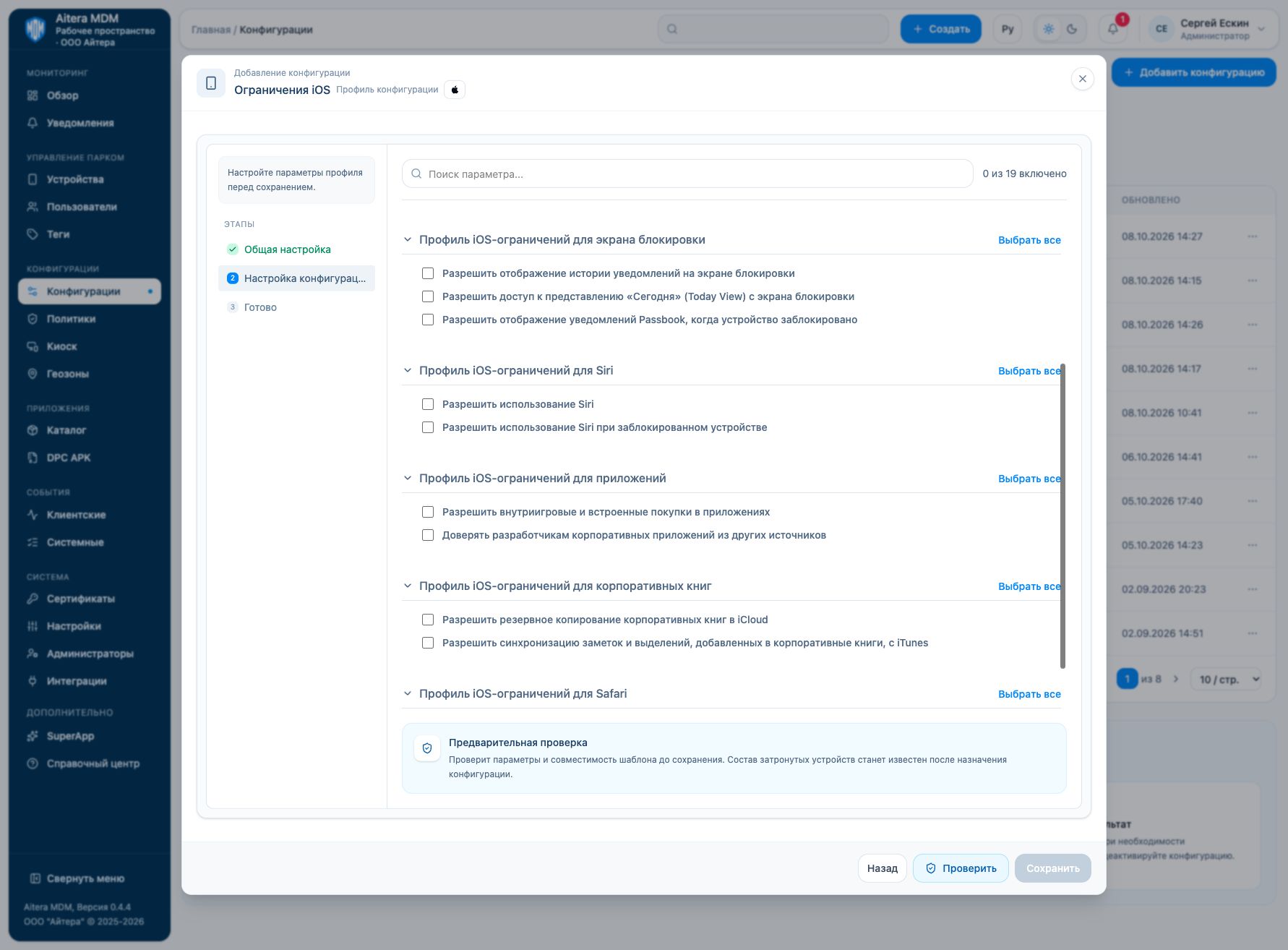
Meaning of the toggles
The iOS template contains permissive and enforcing parameters: “Allow” and “Force” have different meanings. Do not enable all items as universal protection. A zero value in the form does not prove an effective prohibition on the device before the profile is assigned and applied.
Conditions of application
Check the management channel (proprietary DPC or Android Enterprise), mode, OS version, and management rights. Minimum OS versions are not shown in the received form; the former help tables are not considered confirmation of compatibility with the current template. First use the preliminary check, then a test device.
iOS restrictions profile for the device
This section groups the settings of the device and its system functions. Each item defines a separate behavior; “Select all” changes all items of this block only.
Allow screenshots and screen recording
Turning it on allows screenshots and screen recording. Turning it off expresses a prohibition according to the parameter name.
Verification: Check a screenshot and the built-in recording separately.
Allow using the camera
Allows the use of the camera; this is a permissive parameter, not a “camera prohibition”.
Verification: Check the system camera and a work application.
Allow automatic device unlock
Allows the automatic unlock feature where the OS and hardware support it. It does not cancel the passcode.
Verification: Check support for the feature on the target platform; the name in the iOS template does not prove support on every model.
Enable on-device translation processing without contacting Apple servers
Requires local processing of translations without contacting Apple servers. Supported languages and local resources are needed.
Verification: Check translation without a network after the language data is prepared.
Force on-device dictation only
Requires dictation to be processed on the device. Availability depends on the language, OS, and hardware.
Verification: Check dictation in the required language without a network.
Allow personalized ads
Allows Apple ad personalization; it is not a general blocking of ads in applications.
Verification: Check the system personalized ads setting.
Hide on-screen notifications when Apple Watch is not on the user’s wrist
Requires hiding notifications when Apple Watch is not worn. This is a parameter for a supported pair of devices, not a universal iPhone restriction.
Verification: Check with a paired watch; for a device without a watch, applicability needs clarification.
Allow over-the-air (OTA) root certificate updates
Allows over-the-air updates of root certificates. It does not add your corporate certificate automatically.
Verification: Check the effective profile and the trust state; the corporate certificate is delivered separately.
iOS restrictions profile for the lock screen
This section groups the settings of this profile area. Each item defines a separate behavior; “Select all” changes all items of this block only.
Allow showing notification history on the lock screen
Allows notification history on the lock screen; the content of the notifications themselves is set by other settings.
Verification: Lock the device and check the notification history.
Allow access to Today View from the lock screen
Allows opening Today View from the locked screen.
Verification: Check the gesture that opens Today View after locking.
Allow showing Passbook notifications when the device is locked
Allows Passbook/Wallet notifications on a locked device.
Verification: Check the notification of the corresponding application on the lock screen.
iOS restrictions profile for Siri
This section groups the settings of this profile area. Each item defines a separate behavior; “Select all” changes all items of this block only.
Allow using Siri
Allows the use of Siri; access on the lock screen is set by a separate item.
Verification: Check invoking Siri after unlocking.
Allow using Siri when the device is locked
Allows Siri on a locked device. Siri itself must be available.
Verification: Check invoking Siri before unlocking.
iOS restrictions profile for applications
This section groups the settings of this profile area. Each item defines a separate behavior; “Select all” changes all items of this block only.
Allow in-game and in-app purchases
Allows in-app purchases. It does not provide a payment method and does not confirm the organization’s permission to pay.
Verification: Check the availability of a purchase without completing a paid transaction.
Allow trusting enterprise app developers from other sources
Allows trust in third-party enterprise application developers. It does not cancel the requirements for the application’s signature and validity.
Verification: Check the trust menu and the launch of an agreed corporate application.
iOS restrictions profile for enterprise books
This section groups the settings of this profile area. Each item defines a separate behavior; “Select all” changes all items of this block only.
Allow backing up enterprise books to iCloud
Allows backing up managed enterprise books to iCloud; not all corporate data.
Verification: Check the profile and the backup settings of a managed book.
Allow syncing notes and highlights added to enterprise books with iTunes
Allows syncing of notes and highlights of enterprise books according to the template description. The availability of the specified iTunes path depends on the platform.
Verification: Check the managed book specifically and the available sync method.
iOS restrictions profile for Safari
This section groups the settings of this profile area. Each item defines a separate behavior; “Select all” changes all items of this block only.
Enable fraudulent website warning
Enables the Safari warning about fraudulent websites. It is not a universal web filter.
Verification: Check the effective Safari setting without visiting dangerous sites for the test.
Enable JavaScript support in Safari
Allows JavaScript execution in Safari. Turning it off may break web applications.
Verification: Check an allowed work web application that uses JavaScript.
Assignment and result
Create a configuration, run the preliminary check, and assign it to recipients. In the device card, check the assignment, contact, and application events. If there is no result, check the mode, channel, delivery, and compatibility; an “Active” entry in the configuration list does not by itself prove enforcement.