SMTP Server
System emails through your organization’s SMTP. SMTP does not replace push delivery of MDM commands.
Open Integrations → Add integration → SMTP Server. For an already installed connection, use Configure.
Preparation
- Get the hostname, port, TLS mode, user name, and password of a dedicated sender account from the mail administrator.
- Specify a From Email permitted for this account. Port 587 with STARTTLS or 465 with implicit TLS is usually used — the exact parameters are set by the provider.
- If the provider requires an app password, create it in the account settings instead of using the regular password.
- Save the configuration and send a test message to a controlled address.
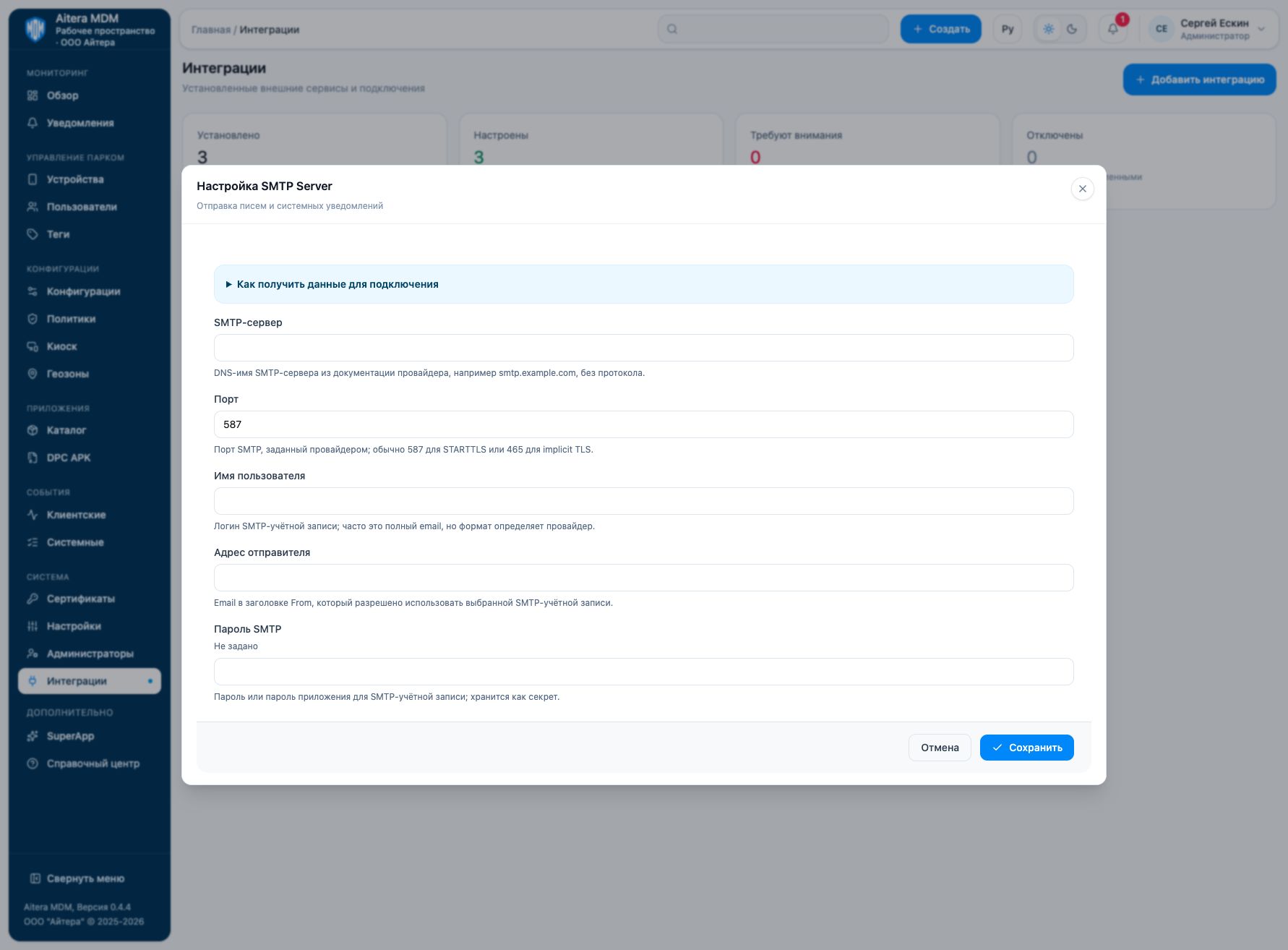
Parameters
| Field | Type | Purpose and filling rules |
|---|---|---|
| SMTP server | Setting | DNS name of the SMTP server from the provider documentation, for example smtp.example.com, without the protocol. |
| Port | Setting | SMTP port set by the provider; usually 587 for STARTTLS or 465 for implicit TLS. |
| User name | Setting | SMTP account login; often a full email address, but the format is defined by the provider. |
| Sender address | Setting | Email in the From header that the selected SMTP account is allowed to use. |
| Use TLS | Automatic | In the current form, TLS is enabled on save; there is no separate switch. The server parameters must support the selected secure mode. |
| SMTP password | Secret | Password or app password for the SMTP account; stored as a secret. |
Saving and changing
Fill in the parameters and click “Save”. When the form is reopened, secrets are not shown: the secret presence indicator is not its value. An empty field for an existing secret keeps the previous value; a new value replaces it. After making changes, check the connection again.
The SMTP Server type is available in the full integration catalog.
Verifying the result
- Save the settings and run the connection check.
- To check delivery, use an allowed test address and an MDM action that actually sends an email.
- Check that the email is received, the From address, the spam folder, and the mail server log.
The “Configured” status means the settings are saved. Evaluate the result of the connection check and the result of the target operation separately. Details of the check are available on the connection card.
Limitations and dependencies
The port must be a number from 1 to 65535. TLS is used when the current form is saved; there is no separate switch to disable TLS. The STARTTLS or implicit TLS mode must match the server and the port. The sender address can differ from the login only if the provider allows it.
Troubleshooting
| Symptom | What to check |
|---|---|
| Authentication error | Verify the SMTP login, the app password, and whether the provider permits SMTP AUTH. |
| The connection cannot be established | Check DNS, outbound access from the MDM server, the port, and the TLS mode. |
| The check succeeds, but there is no email | Check the recipient’s availability, the permitted From, and the mail server response. A connection does not prove delivery. |